quickdictate · v0.5.0 · windows 10/11 x64
Press a key, talk, and your words land wherever your cursor already is.
Hold a hotkey and dictate into any app. Use six cloud providers, or install Cohere or Whisper for fully offline speech recognition.
// new in v0.5.0
Go fully offline, without turning setup into a project.
Pick Local in Settings, install one model, and keep every recording on your PC. No key and no QuickDictate account required.
Two local models
Cohere Transcribe Q5 is the 1.65 GiB accuracy-first default. Whisper Large v3 Turbo Q5 is a smaller 591 MiB option with broader language coverage.
One-click model management
Install, select, cancel a download, or delete either model in Settings. Downloads run in parallel when supported and are verified before QuickDictate uses them.
Warm, visible, and ready
The selected model prewarms in the background and stays ready. A spinner shows final processing, an early next hotkey is queued, and switching back to cloud releases the model's RAM and VRAM.
v0.5 also stays lighter over long sessions: bounded audio, log, clipboard, update, and network buffers; chunked long Google recordings; less idle polling; and fixes for duplicate audio, emoji pasting, cold local results, and Save & Restart returning to Settings.
// features
Does one thing, gets out of the way.
No sign-up, no dashboard, no monthly bill.
Cloud or fully local
Bring a key to one of six cloud services, or install an optional local model and keep your audio on the PC.
Types into any window
Your editor, a chat box, a terminal, some random web form. If you can type there, so can QuickDictate.
Feedback that matches the engine
Five cloud engines stream words live. Google and Local finish after release, with clear processing feedback while they work.
Hold it or tap it
Hold the key to talk, or tap to start and stop, whichever you like. Defaults are F13 and F14 (keys nothing else uses), and you can change them.
"Scratch that"
Said the wrong thing? Say "scratch that" and the last bit deletes itself. No mouse required.
Fixes what it mishears
It mishears "chat gpt" and "github" like everything does. Give it a short fix-list and it handles the rest.
Per-app profiles
Dictate one way in your editor and another in Slack. It spots which app you're in and switches on its own.
// simple settings
One small Settings window. Plain JSON underneath.
Choose a cloud service and paste a key, or choose Local and install a model with no key at all. Advanced users can still edit one readable file.
- Local is managed in the app. Pick Cohere or Whisper, then install, cancel, switch, or delete it from the same screen.
- Got more than one cloud key? It rotates through them and routes around keys that are dead or throttled.
- It's just a file, so back it up, throw it in git, or copy it to a new machine in seconds.
{
  "stt_provider": "local",
  "local_model": "cohere-q5",
  "language": "en-US",
  "mode": "toggle",
  "toggle_hotkey": "f14"
}
// providers
Seven engines. Cloud when you want it, local when you don't.
Use six bring-your-own-key services, or process audio on your PC with an optional Cohere or Whisper model. Switch whenever you like.
The app stays small until you choose Local. Model weights download on demand to Local AppData instead of living in the executable or source repository, and you can delete either model from Settings at any time.
Stack a few keys for one cloud provider and QuickDictate spreads requests across them, routing around any that go down.
// inside settings
Everything's in one window.
Pick cloud or Local, manage keys and models, tune your hotkeys, and edit text replacements without leaving one window.
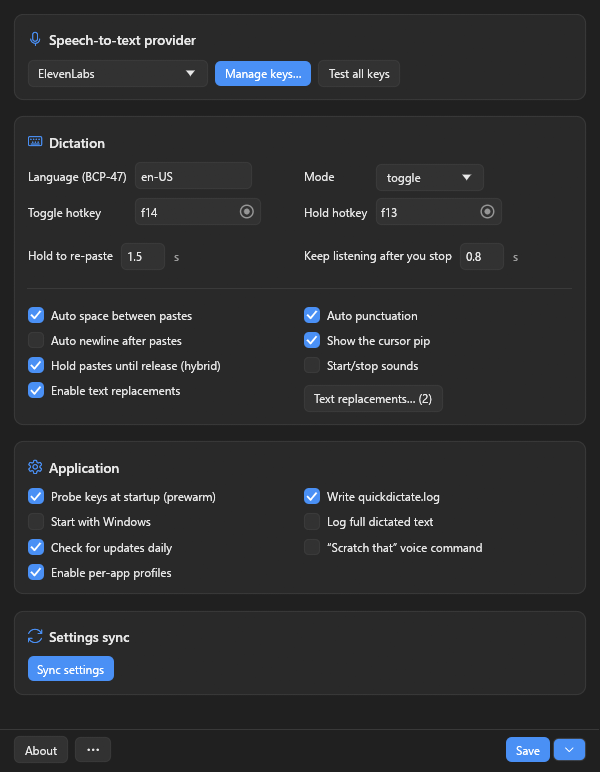
Providers, keys, hotkeys, and the everyday toggles on one screen.
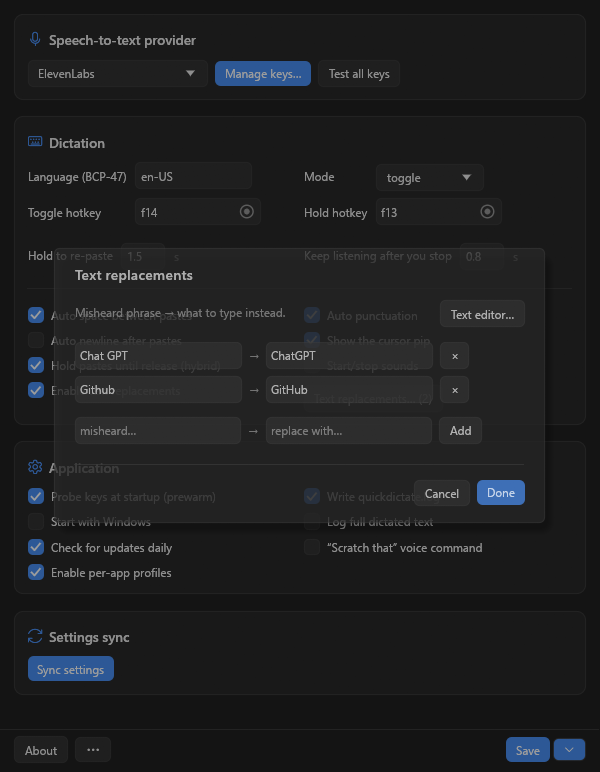
The replacement table. Teach it your words once and forget about it.
// privacy
Choose cloud, or keep every word local.
With Local selected, audio is processed entirely on your PC. With a cloud provider, it goes directly to only the service you chose using your key — there is no QuickDictate transcription server in the middle.
-
Fully offline when you want itMicrophone audio is processed on this PC. No API key or internet connection is needed after installation.
-
Bring your own cloud providerUse a key from a service you trust. QuickDictate adds no account, proxy, or subscription.
-
Verified updates, if enabledThe optional daily GitHub check can install a new version automatically only after its download is verified.
-
Open source, MIT-licensedIt's all on GitHub under an MIT license. Poke around, fork it, build your own.
// ready when you are
Ready to stop typing so much?
v0.5.0 is free, open source, and runs on Windows 10 and 11. Start with cloud, go fully local, and switch whenever you like.